

How Real-Time Inventory Sync Prevents Overselling in Your Shopify Store


Key Takeaways
- Overselling happens when Shopify displays more stock than the supplier, warehouse, or shared inventory pool can actually fulfill.
- Real-time inventory sync shortens the gap between a stock change and the quantity shown in Shopify.
- Even fast syncing cannot remove every risk when several merchants sell from the same supplier stock.
- Inventory buffers protect your store by holding back part of the supplier’s reported quantity.
- The right buffer depends on sales speed, supplier reliability, shared-stock exposure, and the cost of canceling an order.
Why Shopify Overselling Starts With an Inventory Delay
Your supplier reports five available units, and Shopify displays five. Before the next update arrives, another retailer sells three of them. Your store still shows five units, even though only two remain available.
That timing gap is one of the main causes of overselling in dropshipping, multi-supplier, and multi-store operations.
What Is Real-Time Inventory Sync?
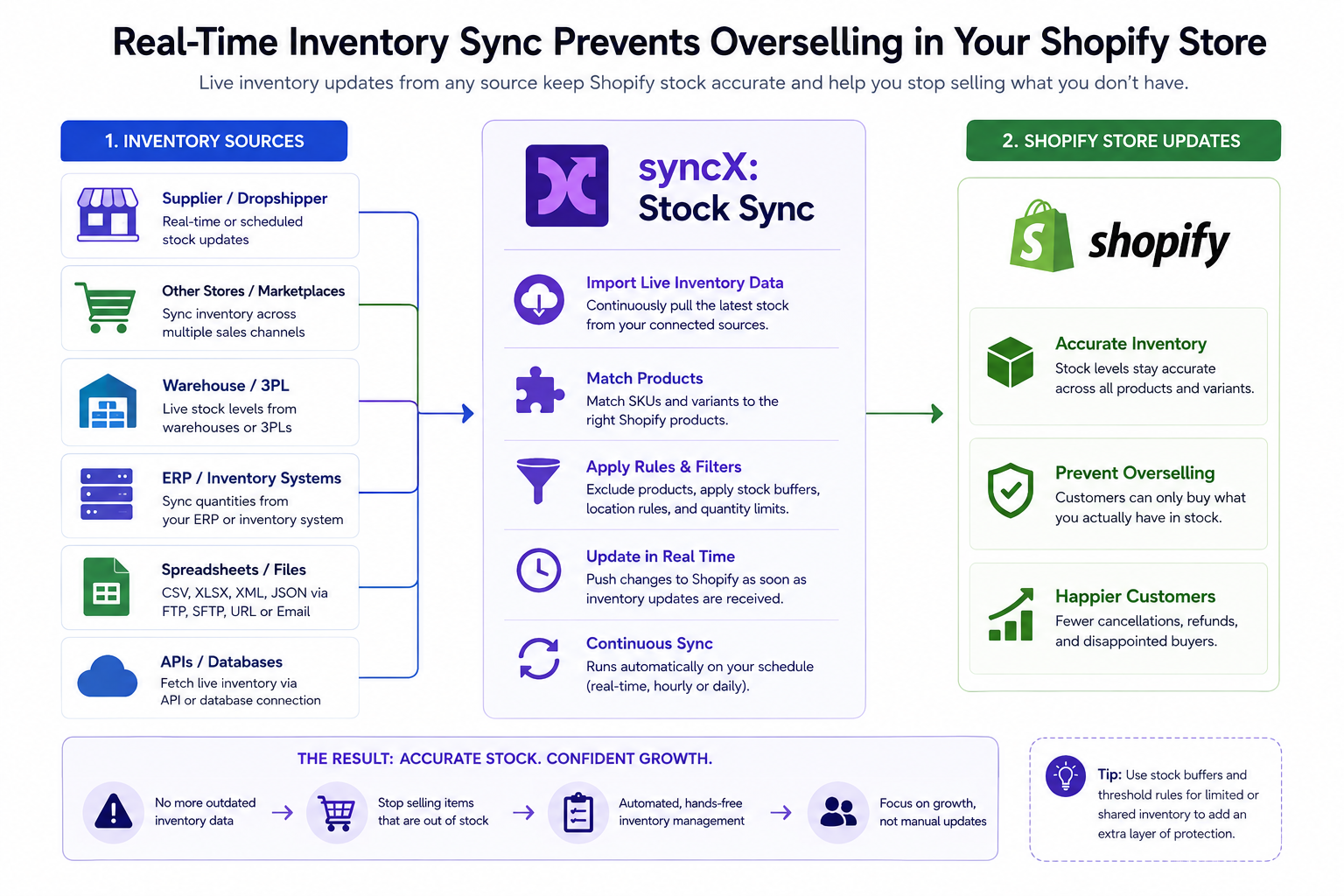
Real-time inventory sync automatically updates Shopify when stock changes in a connected supplier, store, warehouse, ERP, or inventory system.
Instead of waiting for someone to download a spreadsheet and upload new quantities, inventory changes move through an automated connection.
syncX: Stock Sync can connect Shopify with supplier feeds, warehouses, APIs, spreadsheets, ERP systems, and other ecommerce stores. Real-time syncing is supported between Shopify, WooCommerce, and BigCommerce stores, while other sources can run on configured schedules.
The goal is not simply to run updates as often as possible. It is to reduce the time between a real stock change and the quantity customers see.
The risk becomes clearer when you follow the stock movement step by step.
How Overselling Actually Happens
Overselling is easier to understand as a sequence.
Consider this example:
- A supplier reports ten available units.
- Shopify receives the update and displays ten.
- Another retailer sells four units from the same supplier.
- A wholesale order reserves another three.
- Your Shopify store still displays ten until the next update.
- Four customers place orders through your store.
- The supplier now has only three units available.
Your store accepted one order that cannot be fulfilled.
The Shopify quantity was correct when it was last updated. The problem appeared because the real quantity changed before Shopify received the next update.
Shared Inventory Creates the Highest Risk
Overselling becomes more likely when the same units are available through:
- Several dropshipping merchants
- Multiple ecommerce stores
- Online marketplaces
- Wholesale orders
- Physical retail locations
- Different sales regions
Every order reduces the same stock pool.
Your Shopify store may not know about those sales immediately, especially when the supplier publishes stock through recurring files rather than a direct store connection.
Checkout Creates Another Timing Gap
A stock change can also happen while a customer is browsing or completing checkout.
Suppose Shopify displays one remaining unit. Before your customer finishes paying, another retailer sells that unit through a different channel.
Even a fast inventory sync may not receive and apply the change before checkout is completed.
This is why faster syncing reduces overselling risk but cannot guarantee that shared inventory will never be oversold.
What Real-Time Inventory Sync Can and Cannot Prevent
What It Can Reduce
A reliable inventory sync can reduce overselling caused by:
- Manual spreadsheet uploads
- Long gaps between supplier updates
- Separate quantities across connected stores
- Delayed stock corrections
- Products remaining available after the source reaches zero
- Employees forgetting to update Shopify
syncX: Stock Sync can update supplier quantities automatically, maintain inventory across multiple sources, and record inventory changes and sync activity.
That removes much of the manual delay that causes inventory mismatches.
What It Cannot Fix
Inventory sync cannot fix:
- Supplier data that is already wrong
- Stock that the supplier has not reported
- Reserved units included in the wrong quantity field
- Orders placed between source updates
- Multiple merchants competing for the final unit
- Incorrect product or variant matching
Your sync must use the supplier’s sellable quantity, not a total that includes committed or reserved stock. For the full mapping process, read to Field Mapping Explained: How syncX: Stock Sync Matches Supplier SKUs, Prices and Quantities to Shopify.
When the remaining risk is caused by shared stock or timing, the next layer of protection is an inventory buffer.
What Is an Inventory Buffer?
An inventory buffer is stock that you deliberately hold back from Shopify.
If your supplier reports ten units and you apply a buffer of two, Shopify displays eight sellable units.
The remaining two units create a safety margin between the supplier’s reported quantity and the quantity customers can order through your store.
A buffer can protect against:
- Stock sold by other merchants before your next update
- Orders placed between syncs
- Supplier reporting delays
- Reserved inventory
- Minor quantity errors
- Sudden sales spikes
syncX: Stock Sync supports quantity rules, including deducting buffer stock and setting low supplier quantities to zero.
A buffer does not create more inventory. It makes Shopify more conservative about how much stock it exposes.
Four Ways to Apply an Inventory Buffer
1. Fixed-Unit Buffer
A fixed-unit buffer subtracts the same number from every supplier quantity.
This is simple to manage and works well when products have similar stock levels and sales patterns.
However, the same two-unit buffer may be too small for a fast seller and too aggressive for a slow product with limited stock.
2. Minimum Stock Threshold
A minimum threshold stops Shopify from selling once supplier inventory falls below a chosen quantity.
For example:
- Six units or more: continue selling
- Three to five units: expose a reduced quantity
- One or two units: set Shopify inventory to zero
- Zero units: remain unavailable
This strategy is useful when the final few supplier units are most likely to sell before the next reliable update.
syncX: Stock Sync quantity rules can set products below a chosen level to zero, helping prevent low supplier quantities from remaining available.
3. Percentage Buffer
A percentage buffer publishes only part of the supplier’s reported quantity.
If the supplier reports 100 units and you expose 90%, Shopify receives 90 units.
This works better than a fixed deduction when supplier quantities vary widely across the catalog.
A two-unit buffer makes little difference to a product with 500 units, while a percentage rule scales with the available stock.
4. Product-Specific Buffer
Product-specific buffers apply different rules according to risk.
A larger buffer may be appropriate for:
- Fast-moving products
- Limited releases
- Seasonal items
- Products shared by many retailers
- Suppliers with less predictable updates
- Items that are expensive to cancel or refund
Products with deep, stable inventory may need little or no buffer.
This is often more effective than applying one rule across the entire catalog.
The buffer type matters, but the amount you hold back matters just as much.
How to Choose the Right Stock Buffer
There is no universal buffer that works for every store.
The right amount depends on how much stock could disappear before Shopify receives its next dependable update.
Consider these factors:
How Quickly Does the Product Sell?
A product selling ten units per hour needs more protection than one selling twice per month.
Review sales velocity by SKU rather than treating the whole catalog the same.
How Many Merchants Share the Inventory?
The more retailers selling from the same supplier pool, the less control you have over the final units.
Shared stock usually needs a more cautious threshold.
How Reliable Is the Supplier Quantity?
A supplier with accurate, frequent updates may require a smaller buffer.
A supplier whose stock regularly differs from the feed may need a larger one.
What Is the Cost of Canceling an Order?
A canceled low-value accessory may create a small service issue.
Canceling a limited-edition product, high-value item, or time-sensitive order can cause a refund, support cost, poor review, and lost customer.
The higher the cancellation cost, the more conservative the buffer should be.
Can the Product Be Restocked Quickly?
Products with dependable replenishment can often use a smaller buffer.
Items with long lead times or uncertain availability need more protection.
Recommended Stock Buffer by Risk Level
These are starting points, not permanent settings.
Review actual canceled orders, stock discrepancies, and missed sales. Then adjust the buffer by supplier, category, or SKU.
Stock Buffer Examples for Different Shopify Stores
Dropshipper Using Shared Supplier Stock
A supplier reports six units, but several merchants can sell them.
Instead of exposing all six, the store may subtract two units or stop selling once the supplier falls below three.
This sacrifices a small amount of potential availability to reduce canceled orders.
Multi-Store Brand Using One Warehouse
A brand operates Shopify, WooCommerce, and BigCommerce stores from the same stock pool.
A supported store-to-store connection can keep quantities aligned more directly. High-demand items may still need a small buffer during launches or traffic spikes.
Merchant Selling Limited-Release Products
The supplier reports two remaining units.
Because the item cannot be replaced and customers are likely to compete for it, the merchant sets Shopify inventory to zero rather than exposing both units.
Missing one possible sale may be less damaging than accepting an order that must be canceled.
Large Catalog With Mixed Sales Velocity
One inventory rule is unlikely to fit every product.
Fast sellers can use higher thresholds. Stable products with deep inventory can expose most of the supplier quantity. Slow products may need no buffer at all.
The rule should follow the product’s risk, not simply the size of the catalog.
What Must Be in Place Before You Use a Buffer
A stock buffer only works when the underlying inventory sync is dependable.
Before applying one, confirm that:
- Each supplier SKU matches the correct Shopify variant.
- The source quantity represents inventory that can actually be sold.
- The supplier feed or connection updates reliably.
- The rule applies only to the intended products and locations.
- A preview or test confirms the final Shopify quantity.
For connection setup, field mapping, filters, and update timing, use the guides on Shopify supplier connection methods, field mapping, and supplier sync filters and schedules.
What Happens When Inventory Reaches Zero?
When the buffered Shopify quantity reaches zero, the next decision is what should happen to the product.
Depending on the product, you may:
- Keep the product visible but unavailable
- Hide it from collections
- Unpublish it temporarily
- Archive it
- Publish it again when stock returns
syncX: Stock Sync can set products to zero when supplier inventory is unavailable and can automate product visibility and republishing based on stock changes.
Read Auto-Remove Out-of-Stock Products: Keep Your Shopify Catalog Clean with syncX: Stock Sync.
Common Inventory Buffer Mistakes
Applying the Same Buffer to Every Product
A universal buffer is easy to configure but often too blunt.
Group products by sales speed, supplier reliability, or cancellation risk.
Setting the Buffer Too High
An oversized buffer can prevent overselling but also hide stock that could have been sold.
The goal is not to eliminate every possible risk by making products unavailable too early. It is to balance protection with sellable inventory.
Using a Buffer to Cover Bad Supplier Data
A buffer cannot repair missing SKUs, incorrect quantities, or unreliable feeds.
Fix the source and mapping first.
Failing to Review Buffer Performance
Sales velocity and supplier reliability change over time. Review canceled orders, stock discrepancies, and missed sales to make sure the buffer is not too small or too restrictive.
Exposing the Final Shared Unit
The final units carry the highest overselling risk when several merchants share the same stock. A minimum threshold is often safer than publishing every remaining unit.
Final Thoughts: Reduce Overselling Without Hiding Too Much Stock
Real-time inventory sync shortens the delay between your supplier and Shopify. A stock buffer protects against the timing and shared-inventory risks that remain.
Used together, they help you expose stock you can fulfill with greater confidence without making products unavailable too early.
Start with a small buffer. Review cancellations, stock discrepancies, and missed sales, then adjust the rule by supplier, category, or product risk.
Start automating Shopify inventory with syncX: Stock Sync, or explore the Shopify syncX: Stock Sync integration today!
Frequently Asked Questions
Can real-time inventory sync completely prevent Shopify overselling?
No. It reduces the delay between a stock change and the Shopify update, but it cannot control supplier errors or prevent another merchant from selling the final shared unit during checkout.
A stock buffer adds protection for those remaining timing gaps.
How much inventory should I hold back as a buffer?
Start with the number of units likely to sell or disappear before the next dependable update.
For low-risk products, this may be one unit. Fast-moving or heavily shared products may need a larger threshold.
Should every product use the same stock buffer?
No. Products have different sales speeds, supplier reliability, and cancellation costs.
Product-specific or category-based rules are usually more accurate than one catalog-wide buffer.
Can syncX: Stock Sync set low supplier quantities to zero?
Yes. syncX: Stock Sync quantity rules can set products below a selected threshold to zero or deduct a buffer from the supplier quantity.
Does a stock buffer reduce sales?
It can reduce the quantity displayed in Shopify, so an overly large buffer may hide stock that could have sold.
The purpose is to reduce costly cancellations without withholding more inventory than necessary.
When should I use a minimum threshold instead of a fixed buffer?
Use a minimum threshold when the final few units carry much more risk than the rest of the supplier stock.
A fixed buffer is better when you want to subtract a consistent quantity across similar products.




.jpg)






Start Automating Your Inventory Today


Company Reg: 1047341V
5-13-05, Block 5, VSQ @ PJ City Centre, Jln Utara, 46200 Petaling Jaya, Selangor.


.svg)